%20--%3e%3cdefs%3e%3cstyle%3e%20.st0,%20.st1%20{%20fill:%20%23fff;%20}%20.st2%20{%20fill:%20%2372b62b;%20}%20.st3%20{%20fill:%20%233e3559;%20}%20.st1,%20.st4%20{%20display:%20none;%20}%20.st5%20{%20fill:%20%23d1cb08;%20}%20%3c/style%3e%3c/defs%3e%3cg%20id='Ebene_3'%20class='st4'%3e%3crect%20class='st2'%20x='-.51'%20y='-.83'%20width='161.79'%20height='34.67'/%3e%3c/g%3e%3cg%20id='Ebene_2'%3e%3cg%3e%3crect%20class='st1'%20x='1.24'%20y='1.59'%20width='157.66'%20height='29.97'%20rx='5.11'%20ry='5.11'/%3e%3cpath%20class='st0'%20d='M154.46,33.01H5.67c-3.13,0-5.67-2.68-5.67-5.97V6.03C0,2.74,2.54.06,5.67.06h148.79c3.13,0,5.67,2.68,5.67,5.97v21c0,3.29-2.54,5.97-5.67,5.97ZM5.67,1.13c-1.92-.02-4.66,2.2-4.66,4.91v21c0,2.71,2.69,4.91,4.66,4.91h148.79c2.57,0,4.66-2.2,4.66-4.91V6.03c0-2.71-2.09-4.91-4.66-4.91H5.67Z'/%3e%3c/g%3e%3cg%3e%3crect%20class='st3'%20x='1.4'%20y='1.57'%20width='157.49'%20height='29.97'%20rx='5.11'%20ry='5.11'/%3e%3cpath%20class='st3'%20d='M154.34,32.02H6.06c-2.45,0-5.05-2.33-5.05-4.82V6.05C1.01,3.22,3.46,1.07,5.93,1.05h148.34c3.39,0,4.85,2.88,4.85,4.97v20.98c0,2.55-1.88,5.03-4.78,5.03ZM6.3,2.05C3.76,2.05,1.9,4.12,1.9,6.66v19.74c0,2.54,1.94,4.61,4.48,4.61h147.4c2.54,0,4.61-2.07,4.61-4.61V6.66c0-2.54-2.07-4.61-4.61-4.61H6.3ZM159.12,26.99c0,2.49-1.88,5.03-4.78,5.03'/%3e%3c/g%3e%3crect%20class='st5'%20x='1.93'%20y='2.05'%20width='82.75'%20height='28.97'%20rx='4.6'%20ry='4.6'/%3e%3cg%3e%3cpath%20class='st0'%20d='M6.53,26.54V6.93h5.66c7.23,0,10.84,3.19,10.84,9.56,0,3.03-1,5.46-3.01,7.29-2.01,1.84-4.69,2.75-8.07,2.75h-5.43ZM9.77,9.7v14.1h2.6c2.29,0,4.07-.63,5.34-1.89s1.91-3.04,1.91-5.33c0-4.58-2.37-6.88-7.12-6.88h-2.72Z'/%3e%3cpath%20class='st0'%20d='M34.7,26.87c-2.83,0-5.09-.92-6.79-2.75-1.7-1.83-2.55-4.22-2.55-7.15,0-3.15.87-5.67,2.6-7.55,1.73-1.88,4.08-2.82,7.05-2.82,2.75,0,4.97.91,6.65,2.73,1.68,1.82,2.52,4.21,2.52,7.15,0,3.2-.86,5.73-2.58,7.59s-4.02,2.79-6.9,2.79ZM34.85,9.46c-1.8,0-3.26.67-4.38,2.01-1.13,1.34-1.69,3.1-1.69,5.29s.55,3.93,1.64,5.26,2.52,2,4.29,2c1.88,0,3.36-.63,4.44-1.9,1.08-1.27,1.63-3.04,1.63-5.32s-.53-4.15-1.58-5.43c-1.05-1.28-2.5-1.91-4.35-1.91Z'/%3e%3cpath%20class='st0'%20d='M61.45,25.72c-1.48.77-3.31,1.15-5.51,1.15-2.84,0-5.12-.9-6.84-2.69-1.71-1.8-2.57-4.15-2.57-7.07,0-3.14.96-5.67,2.89-7.6,1.93-1.93,4.36-2.9,7.31-2.9,1.9,0,3.47.27,4.72.81v3.23c-1.32-.78-2.78-1.18-4.38-1.18-2.12,0-3.84.68-5.16,2.04-1.32,1.36-1.98,3.17-1.98,5.44s.62,3.88,1.85,5.16,2.85,1.92,4.85,1.92c1.85,0,3.45-.44,4.81-1.31v3.01Z'/%3e%3cpath%20class='st0'%20d='M80.25,18.61c0,5.5-2.61,8.26-7.82,8.26s-7.49-2.65-7.49-7.94V6.93h3.25v11.32c0,3.85,1.49,5.77,4.48,5.77s4.32-1.85,4.32-5.56V6.93h3.25v11.68Z'/%3e%3c/g%3e%3cg%3e%3cpath%20class='st5'%20d='M105.88,26.54h-3.55l-9.37-14.41c-.24-.36-.43-.74-.59-1.13h-.08c.07.42.11,1.32.11,2.69v12.85h-3.14V6.93h3.79l9.05,14.07c.38.58.63.98.74,1.2h.05c-.09-.52-.14-1.4-.14-2.64V6.93h3.13v19.61Z'/%3e%3cpath%20class='st5'%20d='M116.45,26.54h-3.35V6.93h3.35v19.61Z'/%3e%3cpath%20class='st5'%20d='M137.03,8.36l-10.75,15.44h10.61v2.75h-15.16v-1.49l10.79-15.35h-9.95v-2.76h14.46v1.42Z'/%3e%3cpath%20class='st5'%20d='M153.48,26.54h-11.01V6.93h10.57v2.76h-7.31v5.55h6.74v2.75h-6.74v5.8h7.75v2.75Z'/%3e%3c/g%3e%3c/g%3e%3c/svg%3e)

Every email. One consistent signature.
Manage email signatures centrally and automatically provide up-to-date contact details, corporate design, and defined company information to your Outlook users.
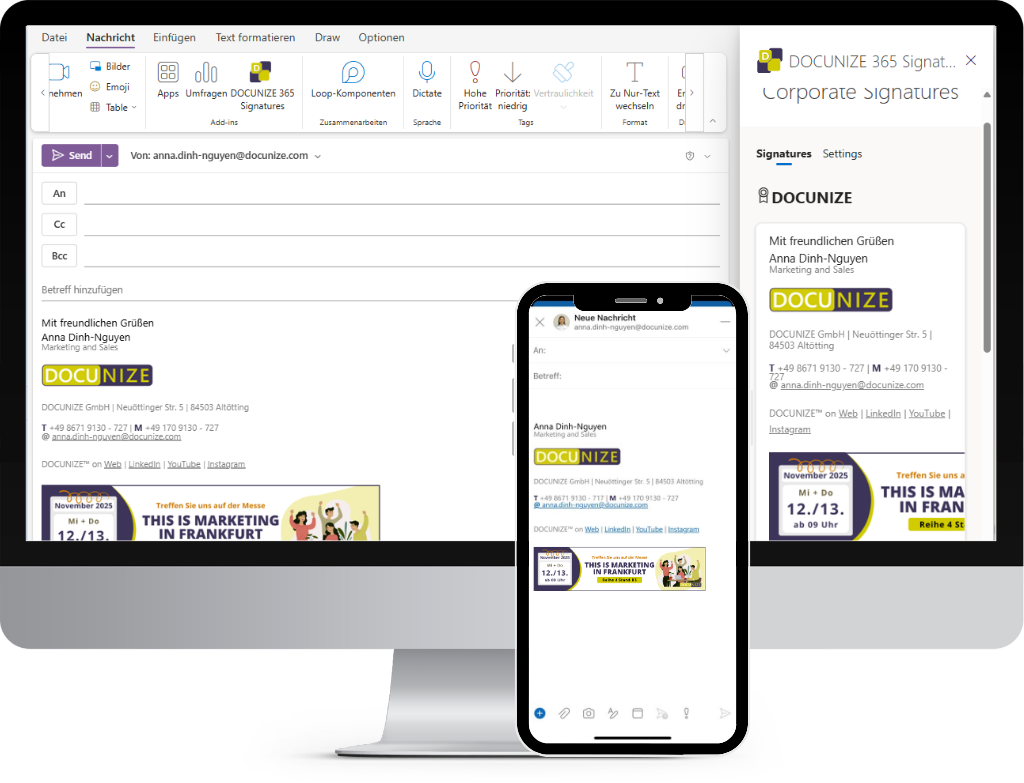
When everyone maintains their own signature, many versions of your brand emerge.
A phone number changes, a logo is replaced, or a company detail needs updating—and suddenly numerous employees have to update their signature themselves.
Inconsistent signatures
Employees design or change signatures individually.
Result: Corporate design and structure differ from person to person.
Outdated contact details
Phone numbers, job titles, or company information are maintained manually.
Result: Old or incomplete details can continue to be sent.
High administrative effort
Changes must be communicated and implemented by employees themselves.
Result: Marketing and IT lose time on review and support.
Unused communication channel
Campaigns, events, or new offers are not systematically delivered via signatures.
Result: A regularly used customer touchpoint remains unused.
One central signature instead of many individual versions.
With DOCUNIZE you manage structure, corporate design, and central content of your Outlook signatures in one place and deploy them purposefully to your employees.
Up-to-date information. Automatically in every email.
Merge data. Fill placeholders. Deploy signature.
Used in the template, among others:
Centrally maintained
Consistent company presence
Automatically personalized
Always up-to-date information
Targeted deployment
e.g. for teams, locations, or campaigns
Easy to integrate
Directly in Microsoft Outlook
How to manage your email signatures centrally.
Design the signature
Define layout, logo, company details, and other signature elements centrally.
Assign data and audiences
Use existing employee information and define which signature is intended for which users, teams, or departments.
Deploy signatures
DOCUNIZE deploys the intended signatures to the corresponding Outlook users.
Update centrally
Changes to design, details, or campaigns are made in one central place and deployed accordingly.
Your brand does not end at the bottom of an email.
Email signatures are among the most frequent digital touchpoints between employees, customers, and business partners. DOCUNIZE ensures this touchpoint stays consistently designed and centrally controllable.
Place campaigns where customer contact happens every day.
Centrally add campaign banners to email signatures and control when and for which audiences they are visible.
- 1
Create campaign
Define period, banner, and content.
- 2
Define audiences
e.g. for departments, locations, or user groups.
- 3
Deploy automatically
The matching campaign is inserted centrally into the signature.
Trade fair 2026: Hall 3, Booth B12
New: Product launch in October
Season's greetings from our team
Time-controlled campaigns
Prepare campaigns for defined periods and deploy them automatically.
Define audiences
Deploy banners for specific departments or user groups, for example.
Update centrally
Manage image, message, and campaign content in one place.
Less manual maintenance. More consistency.
Without central signature management
- Employees maintain signatures themselves
- Different layouts and logos
- Changes must be implemented individually
- Outdated contact details can remain
- Campaigns are hard to coordinate centrally
With DOCUNIZE
- Central signature templates
- Automatically personalized employee information
- Consistent company presence
- Central changes
- Control campaigns in a targeted, time-based way
Everything you need for centrally controlled Outlook signatures.
Central signature management
Manage layouts, company information, and central content from one shared environment.
Automatic personalization
Automatically insert names, job titles, and other employee information into signatures.
Department and user logic
Deploy different signatures purposefully for teams, roles, or employees.
Multiple signatures per user
Manage different signature variants for a user depending on the use case, if supported by the current DOCUNIZE configuration.
Campaign management
Design marketing banners centrally, schedule them, and deploy them purposefully.
Central updates
Maintain signature changes in one place instead of having employees update them individually.
Deployed directly for your Outlook users.
DOCUNIZE connects central signature management with your existing Microsoft 365 environment and uses existing user information for personalized deployment.
Use employee data
Existing user information can be used for personalized signatures.
Control users and groups
Deploy signatures based on roles, departments, or defined audiences.
Administer centrally
Manage signatures, rules, and campaigns from one shared DOCUNIZE environment.
Consistent email communication—without maintaining every signature individually.
When signatures are managed centrally, employees do not have to keep design, contact details, and campaigns up to date themselves. At the same time, marketing and IT gain more control over an important communication channel.
Protect brand presence
Provide consistent signature templates for your company communication.
Reduce administration
Organize changes centrally instead of user by user.
Keep data up to date
Use personalized information from centrally maintained data.
Activate campaigns
Use email signatures purposefully for time-controlled marketing communication.
Frequently asked questions about email signature management.
Make every email a consistent brand presence.
In a personal demo we show you how DOCUNIZE centrally manages Outlook signatures, personalizes employee data, and deploys campaigns for your teams.