%20--%3e%3cdefs%3e%3cstyle%3e%20.st0,%20.st1%20{%20fill:%20%23fff;%20}%20.st2%20{%20fill:%20%2372b62b;%20}%20.st3%20{%20fill:%20%233e3559;%20}%20.st1,%20.st4%20{%20display:%20none;%20}%20.st5%20{%20fill:%20%23d1cb08;%20}%20%3c/style%3e%3c/defs%3e%3cg%20id='Ebene_3'%20class='st4'%3e%3crect%20class='st2'%20x='-.51'%20y='-.83'%20width='161.79'%20height='34.67'/%3e%3c/g%3e%3cg%20id='Ebene_2'%3e%3cg%3e%3crect%20class='st1'%20x='1.24'%20y='1.59'%20width='157.66'%20height='29.97'%20rx='5.11'%20ry='5.11'/%3e%3cpath%20class='st0'%20d='M154.46,33.01H5.67c-3.13,0-5.67-2.68-5.67-5.97V6.03C0,2.74,2.54.06,5.67.06h148.79c3.13,0,5.67,2.68,5.67,5.97v21c0,3.29-2.54,5.97-5.67,5.97ZM5.67,1.13c-1.92-.02-4.66,2.2-4.66,4.91v21c0,2.71,2.69,4.91,4.66,4.91h148.79c2.57,0,4.66-2.2,4.66-4.91V6.03c0-2.71-2.09-4.91-4.66-4.91H5.67Z'/%3e%3c/g%3e%3cg%3e%3crect%20class='st3'%20x='1.4'%20y='1.57'%20width='157.49'%20height='29.97'%20rx='5.11'%20ry='5.11'/%3e%3cpath%20class='st3'%20d='M154.34,32.02H6.06c-2.45,0-5.05-2.33-5.05-4.82V6.05C1.01,3.22,3.46,1.07,5.93,1.05h148.34c3.39,0,4.85,2.88,4.85,4.97v20.98c0,2.55-1.88,5.03-4.78,5.03ZM6.3,2.05C3.76,2.05,1.9,4.12,1.9,6.66v19.74c0,2.54,1.94,4.61,4.48,4.61h147.4c2.54,0,4.61-2.07,4.61-4.61V6.66c0-2.54-2.07-4.61-4.61-4.61H6.3ZM159.12,26.99c0,2.49-1.88,5.03-4.78,5.03'/%3e%3c/g%3e%3crect%20class='st5'%20x='1.93'%20y='2.05'%20width='82.75'%20height='28.97'%20rx='4.6'%20ry='4.6'/%3e%3cg%3e%3cpath%20class='st0'%20d='M6.53,26.54V6.93h5.66c7.23,0,10.84,3.19,10.84,9.56,0,3.03-1,5.46-3.01,7.29-2.01,1.84-4.69,2.75-8.07,2.75h-5.43ZM9.77,9.7v14.1h2.6c2.29,0,4.07-.63,5.34-1.89s1.91-3.04,1.91-5.33c0-4.58-2.37-6.88-7.12-6.88h-2.72Z'/%3e%3cpath%20class='st0'%20d='M34.7,26.87c-2.83,0-5.09-.92-6.79-2.75-1.7-1.83-2.55-4.22-2.55-7.15,0-3.15.87-5.67,2.6-7.55,1.73-1.88,4.08-2.82,7.05-2.82,2.75,0,4.97.91,6.65,2.73,1.68,1.82,2.52,4.21,2.52,7.15,0,3.2-.86,5.73-2.58,7.59s-4.02,2.79-6.9,2.79ZM34.85,9.46c-1.8,0-3.26.67-4.38,2.01-1.13,1.34-1.69,3.1-1.69,5.29s.55,3.93,1.64,5.26,2.52,2,4.29,2c1.88,0,3.36-.63,4.44-1.9,1.08-1.27,1.63-3.04,1.63-5.32s-.53-4.15-1.58-5.43c-1.05-1.28-2.5-1.91-4.35-1.91Z'/%3e%3cpath%20class='st0'%20d='M61.45,25.72c-1.48.77-3.31,1.15-5.51,1.15-2.84,0-5.12-.9-6.84-2.69-1.71-1.8-2.57-4.15-2.57-7.07,0-3.14.96-5.67,2.89-7.6,1.93-1.93,4.36-2.9,7.31-2.9,1.9,0,3.47.27,4.72.81v3.23c-1.32-.78-2.78-1.18-4.38-1.18-2.12,0-3.84.68-5.16,2.04-1.32,1.36-1.98,3.17-1.98,5.44s.62,3.88,1.85,5.16,2.85,1.92,4.85,1.92c1.85,0,3.45-.44,4.81-1.31v3.01Z'/%3e%3cpath%20class='st0'%20d='M80.25,18.61c0,5.5-2.61,8.26-7.82,8.26s-7.49-2.65-7.49-7.94V6.93h3.25v11.32c0,3.85,1.49,5.77,4.48,5.77s4.32-1.85,4.32-5.56V6.93h3.25v11.68Z'/%3e%3c/g%3e%3cg%3e%3cpath%20class='st5'%20d='M105.88,26.54h-3.55l-9.37-14.41c-.24-.36-.43-.74-.59-1.13h-.08c.07.42.11,1.32.11,2.69v12.85h-3.14V6.93h3.79l9.05,14.07c.38.58.63.98.74,1.2h.05c-.09-.52-.14-1.4-.14-2.64V6.93h3.13v19.61Z'/%3e%3cpath%20class='st5'%20d='M116.45,26.54h-3.35V6.93h3.35v19.61Z'/%3e%3cpath%20class='st5'%20d='M137.03,8.36l-10.75,15.44h10.61v2.75h-15.16v-1.49l10.79-15.35h-9.95v-2.76h14.46v1.42Z'/%3e%3cpath%20class='st5'%20d='M153.48,26.54h-11.01V6.93h10.57v2.76h-7.31v5.55h6.74v2.75h-6.74v5.8h7.75v2.75Z'/%3e%3c/g%3e%3c/g%3e%3c/svg%3e)

Share contact details. Always up to date. Always on brand.
Provide your employees with digital business cards that are created from centrally managed contact data and can be shared easily via QR code.
 Microsoft 365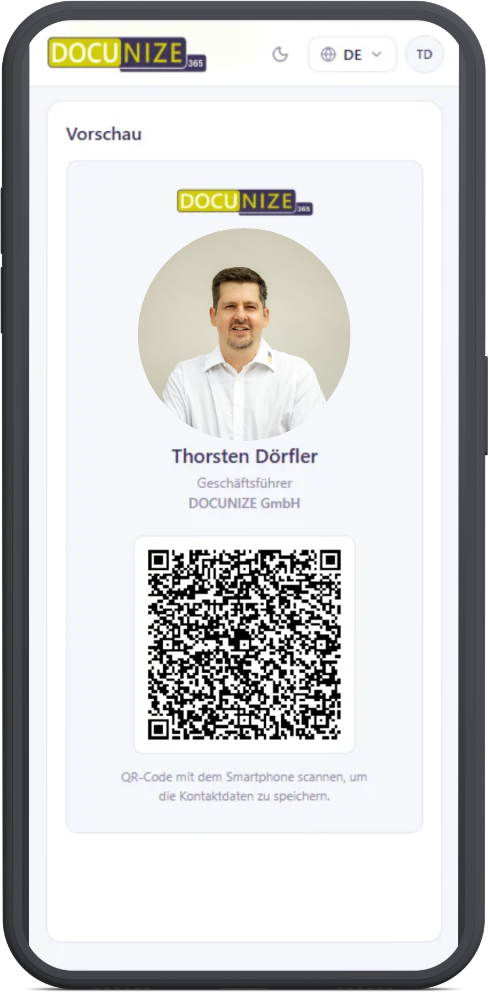
Printed is quickly outdated.
New role, new phone number, or new email address – with classic business cards, every change means new maintenance, a new order, and new cards.
Outdated contact details
Phone numbers, job titles, or email addresses can change while printed cards stay the same.
Result: Outdated contact details continue to be shared.
Manual administrative effort
New or updated business cards must be ordered, produced, and distributed.
Result: Every organizational change creates extra work.
Inconsistent brand presence
Different designs or outdated company information can remain in circulation at the same time.
Result: Your external appearance becomes inconsistent.
Limited flexibility
A printed card cannot be updated after it has been handed over.
Result: Changes do not automatically reach existing contacts via the original card.
A digital business card that stays current with your data.
DOCUNIZE creates digital business cards based on centrally available employee information and provides them in your defined corporate design.
When relevant contact details change, they can be updated centrally. Your employees then access their current digital business card and share it via link or QR code.
Your digital business card in 3 steps.
Connect Azure Entra ID
DOCUNIZE uses the designated user attributes from your Microsoft environment as the basis for digital business cards.
Create the business card automatically
A personal digital business card is created for each user based on the stored data and the designated design.
Share and save contact
The business card is available digitally and can be shared via a QR code or link, for example. The recipient does not need an additional app.
From first contact straight to the smartphone.
Whether at a trade fair, customer meeting, or spontaneous introduction: one QR code is enough to provide your contact details digitally.
Trade fair & event
Show your QR code, let them scan it, and provide contact details digitally right away.
No need to carry or reorder paper cards.
Customer meeting
Share up-to-date contact details directly from your smartphone.
A professional and consistent appearance in personal contact.
Remote & digital
Use the business card as a link in digital communication situations.
Easily pass on contact details even without an in-person meeting.
New employees? The digital business card is included from the start.
As soon as the necessary user information and the corresponding DOCUNIZE assignment are in place, a personal digital business card can be provided automatically for new employees.
No separate order
No individual print or order request for a classic business card.
Central employee data
Name, role, and contact details are taken from the designated central information.
Directly in corporate design
New employees receive a business card in the defined company appearance.
Digitally available when you need it.
The digital business card can be provided via the DOCUNIZE web app and used or shared on a smartphone.
Web-App
Open the digital business card in the DOCUNIZE interface.
Smartphone
Display the business card on mobile.
QR-Code
Share contact details spontaneously.
Save contact
The recipient can save the provided contact details on their smartphone.
No additional app is required for the recipient.
Manage fewer cards. Keep contact details centrally up to date.
Classic business cards
- Printing and reordering required
- Changes make existing cards outdated
- Old cards can remain in circulation
- Individual administrative effort
- Physical cards must be carried along
With DOCUNIZE
- Digital provision
- Central contact data
- Automatic creation
- Consistent corporate design
- Easily shareable via QR code or link
Everything you need for centrally managed digital business cards.
Automatic creation
Provide digital business cards based on existing user information.
Azure Entra ID connection
Use relevant employee attributes from your existing Microsoft environment.
Automatic updates
Reflect changes to centrally managed data in the digital business card.
QR-Code Sharing
Easily provide contact details via a personal QR code.
Corporate Design
Design digital business cards consistently across the entire company.
Link Sharing
Also make digital business cards available via a direct link.
One team. One consistent appearance.
Digital business cards are another touchpoint for your brand. DOCUNIZE ensures that layout, colors, logo, and central company information are provided according to your defined guidelines.
Individual people. Shared brand.
Use contact data that is already managed centrally.
DOCUNIZE connects the digital business card to your existing Microsoft environment and uses the designated user attributes for creation and updates.
Central user information
Use relevant employee data from your Microsoft environment as the foundation.
Automatic personalization
Provide each user with an individual digital business card with their contact details.
Account for changes centrally
When relevant employee data changes, you do not need to design and order new paper cards separately.
Up-to-date contact details. Less administration. Consistent appearance.
Digital business cards connect central employee data with easy networking and a consistent corporate design.
Stay up to date
Account for changes to centrally managed contact data more easily.
Reduce administration
Reduce printing, reorders, and individual maintenance of classic cards.
Share contacts more easily
Provide contact details digitally via QR code or link.
Keep the brand consistent
Issue digital business cards in a unified corporate design.
Less reprinting when data changes.
Digital business cards reduce the need to reprint cards when roles, contact details, or company information change.
Frequently asked questions about the digital business card.
See how digital business cards work in your company work.
In a personal demo, we show you how DOCUNIZE connects employee data, corporate design, and digital business cards – and enables easy QR code sharing for your teams.